Introduction
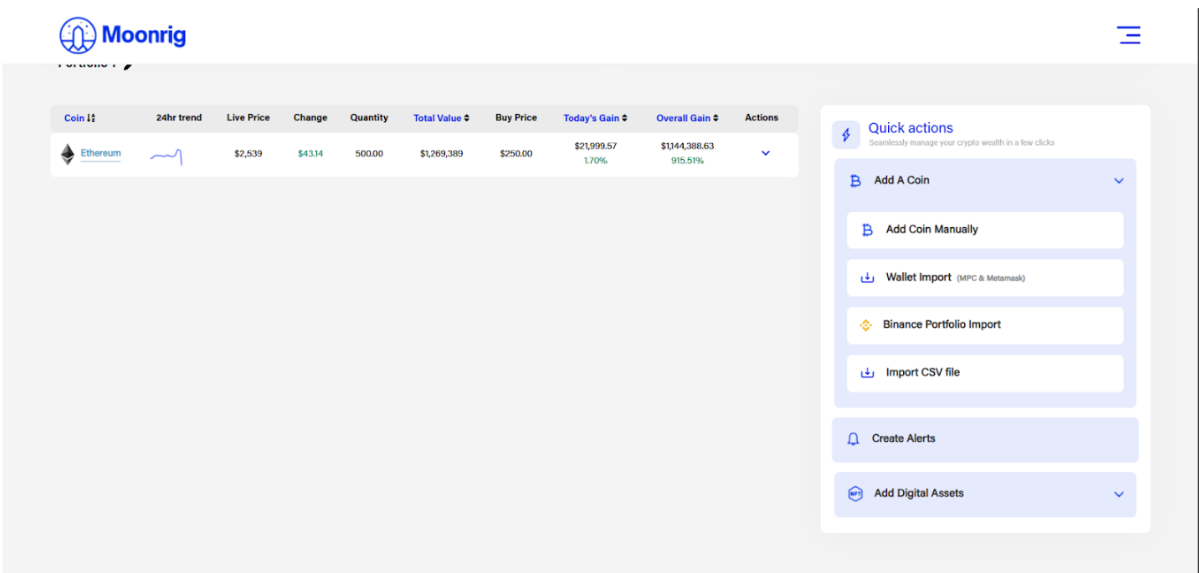
QUICK ACTIONS - INTRODUCTION This section gives you shortcuts to important tools, helping you manage your portfolio faster. The ‘Quick Actions’ panel appears in most pages of the Moonrig dApp.It can be found on the following section/pages on the right side:
- Portfolio/HODL
- NFT
- LAND
- ICO TOKENS
There is one other section/page which displays the ‘Quick Actions’. The TRANSACTIONS item can be accessed from the menu icon (☰). Here, this panel appears on the left side The ‘Quick Action’ Panel allows you to quickly go to:
- Add A Coin
- Add Coin Manually
- Wallet Import
- Binance Portfolio Import
- Import CSV file
- Create Alerts
- Add Digital Assets
- Add NFT
- Add Land
- Add ICO Tokens